

Click happens
There comes a time with gaming mice when marketing buzzwords lose their meaning. Everyone claims to offer ultra-lightweight shells, high-quality sensors, and no latency. The Logitech G PRO X2 SUPERSTRIKE only becomes intriguing once you put down the box and start using it. Metropol’s gadget guy, ex-game reviewer Ian Knott, fires up the gaming PC and attempts to ‘pwn some noobs’, if that’s even still a thing.
With the SUPERSTRIKE, the first thing you feel is the weight, or rather, the lack of it. At about 60 grams, it feels almost hollow yet sturdy. This difference is important. Some ultra-light mice feel like a compromise, as if the material has been stripped away just to meet a weight target. The SUPERSTRIKE doesn’t give off that vibe. It feels intentional and well-balanced. There’s no wobbling in the buttons or creaking in the shell. It just fits comfortably in your hand.
This lightness is noticeable in game. Quick flicks feel sharper. Making small adjustments requires less effort. You’re not battling inertia. If you play shooters, especially those that reward fast tracking and quick corrections, the lighter weight becomes apparent after just a few rounds. It won’t magically improve your aim, but it removes a small barrier between your intention and your movement.
Under that shell is Logitech’s HERO 2 sensor, which goes up to 32,000 DPI with tracking speeds that most people can’t fully take advantage of. Those numbers sound impressive, but what truly counts is reliability. Tracking is smooth and consistent on various surfaces, with no acceleration or smoothing messing with muscle memory. It behaves consistently, which is exactly what you want.
The shape is comfortably familiar. It’s symmetrical, low-profile, and free from exaggeration. It doesn’t try to reinvent ergonomics. Instead, it fits nicely in the hand and doesn’t get in the way. Claw and fingertip grips feel natural, and palm grip users may also find it comfortable unless they prefer something much larger. Logitech has honed this design over several generations, and it shows.
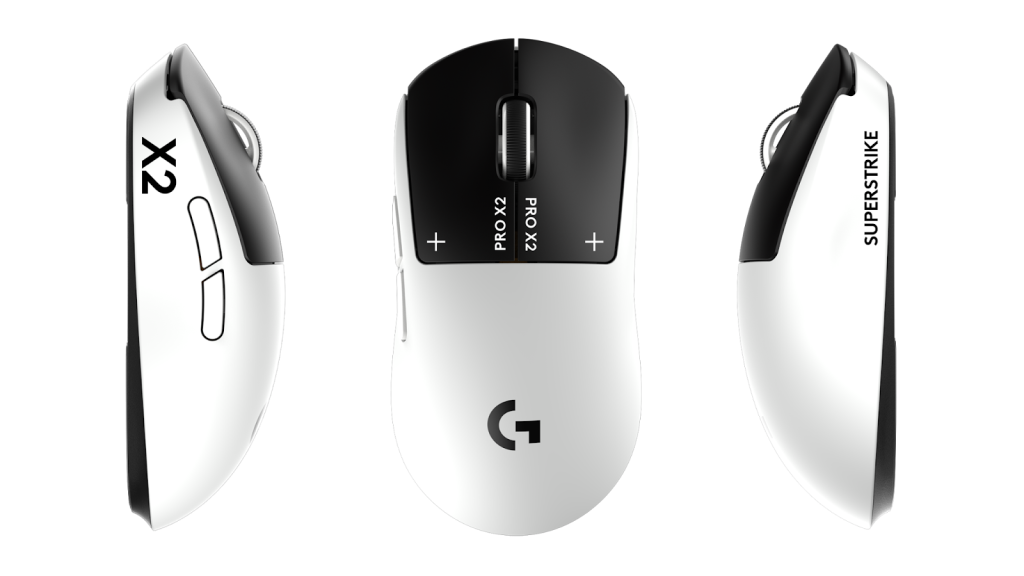
Out of the box, the clicks are fairly soft. The default feedback is quieter and less pronounced than some competitive mice, which may catch some users off guard. The good news is you can adjust it. If you want a more tactile click with clearer feedback, you can change that. It’s worth experimenting instead of sticking with the default feel, as the mouse responds well to those adjustments.
This brings us to Logitech G Hub. It’s essential for maximising the mouse’s potential, but it can also be frustrating to navigate. There are many settings hidden within, from DPI settings to polling rates to adjustments for click feel. Take time to explore it. The SUPERSTRIKE rewards your effort. Any small irritation you notice during early use can often be fixed in the menus.
The downside is that G Hub can be demanding on your CPU when running in the background. On high-end systems, you might not notice any issues, but on less powerful machines, it can affect performance. This can lead to dropped frames in games, which isn’t great when you’ve just invested in a premium mouse meant for competitive play.
Fortunately, there’s an easy fix. Once you set your preferences, save them directly to the mouse’s onboard memory. The SUPERSTRIKE supports this, allowing you to close G Hub without losing your settings. It’s a small step that makes a big difference, especially if you want to get the most out of your hardware.
Wireless performance is seamless, which is the goal. With Logitech’s Lightspeed technology, latency feels just like wired. There’s also Bluetooth for added flexibility with devices, but for gaming, you’ll want the dedicated wireless option. The battery life is solid, lasting long enough that you forget about it, which is one of the best compliments you can give a device.
One thing the SUPERSTRIKE lacks is an overload of buttons. It’s not an MMO mouse packed with programmable inputs. It keeps things simple: main clicks, a scroll wheel, and side buttons. This simplicity matches its focus on competitive play. It’s designed for accuracy and speed, not a library of macros.
After a few weeks, what impresses most is how it fades into the background in a good way. You stop noticing it. The weight becomes unimportant. The tracking feels right. The clicks respond as expected. It doesn’t draw attention to itself with flashy lights or bold designs. It simply performs.
You can find cheaper lightweight mice. There are also heavier, feature-rich options. What the Logitech G PRO X2 SUPERSTRIKE does well is refine the basics. It reduces the experience to sensor accuracy, weight savings, and adjustability, then lets everything else be.
If you’re a player who tweaks sensitivity, cares about polling rates, and pays attention to the difference between a soft click and a sharp one, this mouse makes sense. Just be ready to spend some time in G Hub before making a judgment, and once you finish, save those settings to the onboard memory and close the software.
After that, it’s just you and the cursor. And that’s really what matters.